About: Menace Film
Menace is a short , light-hearted and comedic Film that explores the on going bird situation in Republic polytechnic's canteen.
Presented through the perspective of a student journalist, the film blends comedic tension with real interviews to reveal how students experience these unexpected “avian intruders.”
The film highlights both the frustrations and surprising perspectives surrounding RP’s resident birds
This was film was a CA2 submission for my Module :Single Camera productions
My role:
As the director of Menace, I oversaw the creative vision and execution of the film. I also served as one of the two camera operators, edited the rough audio-visual script, and developed the shot list for the production. In post-production, I took full responsibility for editing the entire film, shaping its pacing, tone, and overall presentation.
My creative & technical process as Director and camera operator
Building from the rough audio-visual script, I scouted suitable filming locations and developed a detailed shot list for each scene. I crafted simple guiding lines for the on-screen talents to improvise, allowing their delivery to feel more natural while still aligning with the film’s direction. I then figured out how to do blocking for each scene and figured out roughly how i would want to edit it in post . Throughout production, I guided the cast before and after each take to achieve the intended tone and performance.
As we filmed, I adapted the shot plan based on time constraints, prioritising the visuals most important to the story. I also introduced small improvisations on set to capture genuine reactions and enhance the film’s light comedic tone.
In my role as a camera operator, I ensured proper preroll for smoother post-production and directed the second cameraman to maintain the same workflow. I also handled on-set audio syncing by coordinating clap cues recorded across all cameras and microphones.
Menace Film
Editing workflow & Processes
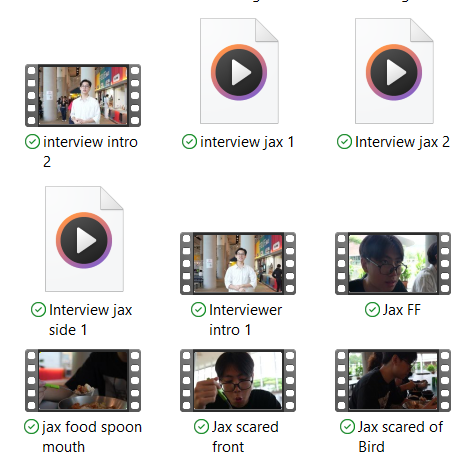
Footage naming and File categorisation
- I First renamed each usable take that we got . by the scene action ,camera angle if there was another angle and sometimes number to differetiate .
- I then created folders to categorise what i neded in the Film such as , Good Camera footage, Audio and music sounds effects & etc
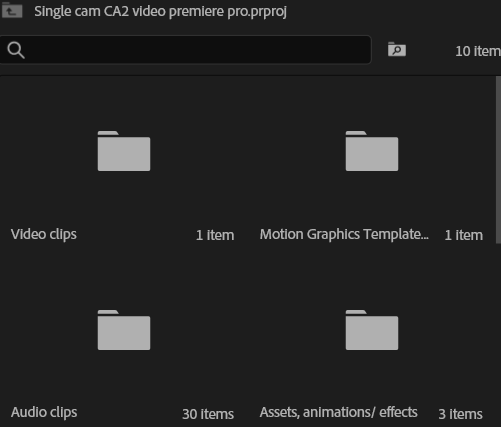
- I then opened Adobe premier pro saved the project file in a proper location and then in premier pro i added the respective Bins in the project panel, such as , Video , audio , motion graphics .etc

Arranging and cutting footage with recorded audio

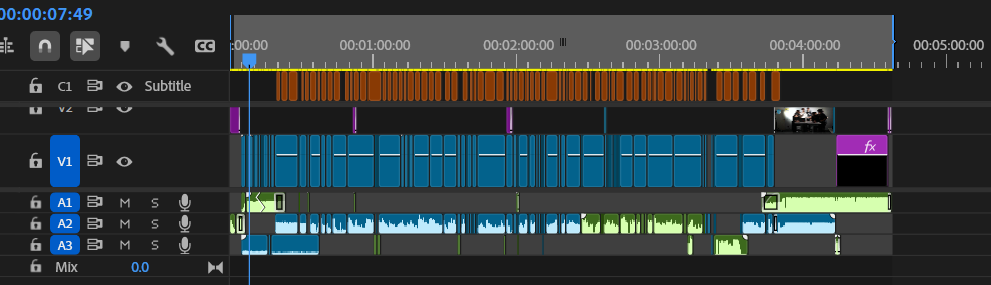
- I Dragged and drop the footage with its linked audio
- I then arranged and cut the clips to my desired pacing and to fit each scene , removing excess in the process
Editing clips & Audio
- I edited the video , I stabilised any shaky footage , reversed , adjusted speed durations and adjusted pacing after i added in music
- I then searched for copyright free assets such as sound effects, music , images & etc ,importing and organised them and then I arranged them where necessary in the timeline
- i then added in some motion graphics where necessary and then faded in and out the clips and placed the transitions that i wanted in the appropriate placements
- I added in audio such as music and certain sound effects that added and shaped the tone of the Film
- I then adjusted audio gain to appropriate levels , using adobe speech enhanced i also tried to enhance the speech as much as I could even though there were some major audio difficulties with some recording and i had to make best with what I got and I fade in and faded out any audio needed for smoother transitions and to match the need of the scene
- I also edited the audio clips in adobe audition if needed editing , pitch and EQ and adding effects such as reverb
Captions
Lastly i then auto transcribed the speech in the film , edited it to match the words spoken properly and made captions from it in adobe premier pro making sure they are visible and matched the pacing of the show i then edited it in terms of fonts and etc